I'll no longer be posting to this blogger. I haven't blogged in a while but if I do it will be at: https://medium.com/@pierrebear so feel free to follow me there.
Thursday, October 1, 2015

Sunday, October 20, 2013
Android Meetup Talk: Tips for Better Android Development

I gave a talk at a Toronto Android meetup earlier today. The turnout was great and I am glad that everyone enjoyed the content. I hope that it will help guide Android developers down the right path. Here is the abstract from the talk:
The goal of this talk is to help bridge the gap between amateur, intermediate, and advanced Android developers. Pierre will provide his tips for more professional, productive, and effective Android development while sharing common mistakes that new and even experienced Android developers make. This talk will be more of a general discussion about software development in the context of Android than a hands on tutorial on how to solve specific programming problems. Pierre hopes to illuminate the path to becoming a highly valuable Android developer and a software craftsman.
I promised I would post my slides and notes so here are the slides and the notes ready for your consumption.
Thanks to everyone that came out and I hope that this information will be useful as well for those who did not make it.
Thursday, May 16, 2013
Installing IdeaVim on Android Studio Preview
Update: This post is no longer relevant. IdeaVim shows up in the Android Studio plugin repository and can be installed as expected.
The announcement of Android Studio at Google I/O 2013 marked the rise of IntelliJ Idea as the new standard for Android development. Being a long time Idea user, I'm glad to see Google moving away from Eclipse and Idea stepping into the lime light. The "What's New in Developer Tools" session from yesterday was essentially an introduction to Idea featuring the CTO of JetBrains and an Android Tools engineer touting the new screen layout preview skins, the resource string hints, and the like. This is a good talk for Eclipse users who want to upgrade to Android Studio, however it was quite tedious for seasoned Idea users.
I was excited about switching from my normal Idea environment to this new Android Studio and loaded up my Android project to find that the IdeaVim plugin no longer showed up in the Plugins repositories. This could be a deal breaker for me. The advantages of Android Studio are easily offset by the loss of productivity I'd suffer if I couldn't use IdeaVim. I'm sure support will be added eventually but that doesn't help me now.
Turns out that a manual installation of IdeaVim works. Here are the steps:
- Download IdeaVim plugin from JetBrains Plugins
- Extract and copy Vim.xml to $HOME/Library/Preferences/AndroidStudioPreview/keymap/ to get the Vim keymap
- Open the Plugins dialog in Android Studio and select "Install plugins from disk..." Locate your extracted IdeaVim.jar and load the plugin.
- Restart Android Studio and the plugin should be activated
It seems that I have IdeaVim working correctly. I haven't spent too much time in Android Studio to know if there are any issues with IdeaVim. I'll keep everyone posted.
Wednesday, June 6, 2012
Curing Depression at Random Hacks of Kindness Toronto
In his 2011 OSCON Data talk, Google's Steve Yegge argued that good hearted programmers will take interest in solving the harder, more impactful, world problems at the end of their careers.
"As you gain wealth, if you're not a total mercenary, you start getting interested in charity and helping people who are needy and you start getting interested in politics, and all these kind of hard problems. And a lot of them, interestingly, are data mining problems."
Yegge challenges programmers to start getting involved now rather than later in their career. He believes that if we spent less time trying to scale FarmVille and more working on the world's hardest problems, we might actually have a good chance of solving them. Yegge actually quits his job at Google at the end of the talk so that he can focus full time on solving these problems.
The other, more notable, instance of this turn to philanthropy is by Bill Gates in his late career. The Bill & Melinda Gates Foundation
was established in 2000, followed by Gates stepping down as CEO to
begin full time work at his charity. The foundation has since had a
major influence on global health, global development, and education.
Random Hacks of Kindness (RHoK) challenges developers to use technology for social good and to work on hard problems that benefit mankind. RHoK organizes hackathons where volunteers sign up to work on a prototype solution to a specific problem.
"RHoK Global June 2012, the 6th Random Hacks of Kindness hackathon, came to a close this weekend, with technologists, designers, experts and activists coming together in 25 cities in 14 different countries to “hack for humanity.” Over 900 people participated worldwide, with the largest event in Nairobi, Kenya at 130 people.
During an intense 36 hours, these 900 hackers for humanity came together in 132 different teams to address 124 unique problems and they built 138 solution." RHoK Blog
During an intense 36 hours, these 900 hackers for humanity came together in 132 different teams to address 124 unique problems and they built 138 solution." RHoK Blog
This was my first time attending RHoK and it was a great experience. The Center for Social Innovation, in downtown Toronto, hosted 40+ volunteers working on 8 different problems ranging from using technology to prevent pregnancy related deaths in developing countries, to georeferencing and organizing imagery from the International Space Station.
My team worked on curing depression through better data collection and analysis. 1datapoint was founded by Jonathan
Polak, a former sufferer of mental health issues, with the idea that one
datapoint is not enough to make a proper diagnosis.
"300 million prescriptions for anti-depressants every year.
Suicide is 2nd highest cause of death for under 25 age group. Most
diagnoses made with just one visit to doctor."
After much discussion about the scope of the problem, the requirements, the possibilities, and the design, we got to work building an Android application for quick, easy and unobtrusive collection of mental health data points. We focused on getting the user in and out as fast as possible; making for a pleasant user experience. We succeeded in prototyping a beautiful, simple and intuitive application that could potentially provide doctors with the crucial background data they've been lacking in their analysis in the past.
Our graphic designers came up with this clean and pleasant design for the home page:

We developed a novel data collection user interface that allows the collection of two data points from a single touch. As the focus is on measuring the delta and not quantifying levels of mental states, we were able to make the graph minimal:

I also was inspired to come up with a minimal UI for time selection that allows setting the time in 2-3 touches:

We decided to have two self-explanatory buttons at the bottom of all data collection pages to reduce the
cognitive burden of the user who may be unsure what the back or home
button will do to their data. Each page has these that allow for a quick
exit. This was one of the many hot topic discussions we had over the weekend on designing a user interface for an anxious person.
Overall, it was a valuable experience both from a philanthropic and from a professional development standpoint. The mix of people at the event was very broad: there were students, professional developers, designers, entrepreneurs, etc. A lot of great demos came out of the weekend and it was wonderful to be in such a dynamic, exciting and creative environment where people were working out the goodness of their hearts rather than for a paycheck. I plan to do more hacking for humanity in the future and will take up Yegge's challenge to start learning about the math, physics, bioinformatics, data mining, and all the other tools that will be essential for using the skills that we have been blessed with as developers to begin developing a better world.
Sunday, February 12, 2012
A Simple Facebook Cover Photo Hack
One of the most beloved changes has been the addition of a large "cover" photo to the profile page. Facebook tells us to: "Fill this wide, open space with a unique image that represents you best. It's the first thing people see when they visit your timeline." Indeed, the cover photo and the profile picture provide a great opportunity for one to show off their creativity. See "Facebook Timeline Cover: 40 creative examples" for some interesting cover hacks.
A simple Facebook cover photo hack is to use the profile picture as a transparent window into the cover photo. LifeHacker recently posted an article describing how to do exactly this with Photoshop or Gimp. Inspired by this post, I decided to make a simple HTML page to preview this kind of cover photo. Below you will find the source code to this test page:
To test out your cover photo, you would modify the img tag (.background img) to point to your large cover photo. The cover photo is 850x315px, but you'll need a larger image than that to show through to the profile picture. Using the Chrome Dev Tools, Firebug, or a similar CSS/DOM debugger you can adjust the dimensions and position of the cover image to your desired position.

Now you still would need to fire up your image editor to crop out your profile picture, which needs to be 180x180, and your cover photo which should be 850x315px. This will require keeping track of the offsets and the dimensions you've been testing with. It makes for a simple tool for seeing what kind of cool cover/profile combinations you can come up with. You can test out your profile picture by enabling the commented out profile img tag and seeing if it worked out the way you desired.

You could now, in theory, do some simple crops with your default system image editor and avoid using the heavyweight Gimp or Photoshop. However, I've found it to be tricky to get Facebook to do exactly what you'd expect with your uploaded photos. I had to do a few uploads of profile pictures before I got the satisfactory alignment which completed my Facebook cover photo hack.

Saturday, October 1, 2011
Bad Android Typography: A Tale of Text Justification
"From all these experiences the most important thing I have learned is that legibility and beauty stand close together and that type design, in its restraint, should be only felt but not perceived by the reader." —Adrian Frutiger

The text above is fully justified with a left and right margin of 200px. Observe the spacing of words on each line and notice the inconsistency. Text justification involves aligning to the left and the right, stretching word spaces to obtain the most uniform amount of per word spacing. When the words are too "loose" it makes for a visually displeasing effect. Hyphenation is used in typography to reduce the looseness of lines. However, browsers don't hyphenate fully justified text. There have been efforts to hyphenate text using Javascript. A script called Hyphenator.js was developed to automatically hyphenate text and is available on Google Code.
On Android, using the standard TextView widget, the problem is worse. The TextView, which is a View used to display text, does not support full justification at all. This means if you wanted to make a reader application similar to the Amazon Kindle app using a TextView, you'd get text that looked like this:

The jagged right side of the text is quite unpleasant and there is much wasted space where more text could fit in the viewport. There is a fairly simple way to get full text justification on Android; it requires using a WebView. A WebView essentially is like embedding a chrome-less browser into your Android application. This means you get all the benefits of laying out text on the Web, as well as the aforementioned deficiency.

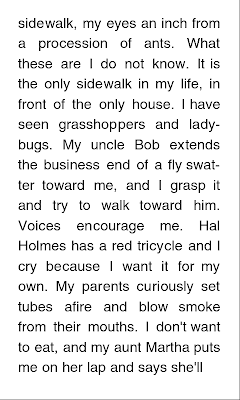 Figure 3: WebView with fully justified text Figure 4: WebView with fully justified text and hyphenation
The image on the left shows how mobile WebKit (the rendering engine which powers the WebView) lays out the fully justified text. The second image shows the layout hyphenated by the Hyphenator.js script. The use of two hyphens greatly improved the spacing for lines like "seen grasshoppers and" and "ladybugs. My uncle Bob". The hyphenated WebView text, while superior to the default TextView and the standard fully justified Web text, still has its flaws. The Amazon Kindle Android app does a better job of laying out the excerpt of Roger Ebert's "Life Itself: A Memoir".

The Kindle app does use hyphenation although it is not shown above. It clearly has a much more uniform spacing of the words though some lines are still suspect. For example: "me. Hal Holmes has a red" stands out. The difference in the WebView layout and the Kindle layout may be attributed to the difference in font type and size, margin size, line spacing etc. The WebView examples use Helvetica and I am not sure which font is being used by the Kindle app. It is also unclear whether or not the Amazon Android app is using its own layout algorithm or is using a WebView with a hyphenation JavaScript.
So it seems that the problem with full justification on the Web plagues Android because developers must use a WebView to achieve it unless they are brave enough to roll their own text justification algorithm. In case you are interested, try solving this problem from Kleinberg's Algorithm Design concerning "pretty printing" of text:

But unless you are passioned by Markov Chains or Dynamic Programming, you'll probably stick to a WebView with text-align: justify.
[Update] I've just discovered that the new CSS3 Text W3C working draft describes support for hyphenation within the browser: http://www.w3.org/TR/css3-text/#hyphenation. In fact, it's been rolled out in the latest WebKit browsers and in Firefox. I haven't tested it out yet but the usage is fairly standard:
When speaking of typography, one must consider a multitude of variables that go into the art of arranging type to display language. There is the selection of the typeface, the point size, the line length, the line spacing, the spacing between groups of letters and the space between pairs of letters. The end goal is of course legibility, however a good designer will seek a visually aesthetic expression of the language through typography. There is an emotive response that follows the sight of visually pleasing typography, it encourages the consumption of the content. Magazines, newspapers and books all have a rich history in beautiful typography.
Figure 1: Bembo text
The Web, being the new canvas for textual content, has been slowly following the lead of its dead tree predecessors. The implementation of the W3C's Web Open Font Format (WOFF) among all modern desktop browsers gives designers limitless possibility for beautiful text design on the web. Where the Web trails behind is in text justification. Full text justification on the Web is known to be flawed (See Batchelder: Bad Web Typography). Text that is fully justified on the Web may lead to terribly inconsistent word spacing that is very noticeable to the reader.
I stand here today humbled by the task before us, grateful for the trust you have bestowed, mindful of the sacrifices borne by our ancestors. I thank President Bush for his service to our nation, as well as the generosity and cooperation he has shown throughout this transition.
Forty-four Americans have now taken the presidential oath. The words have been spoken during rising tides of prosperity and the still waters of peace. Yet, every so often the oath is taken amidst gathering clouds and raging storms. At these moments, America has carried on not simply because of the skill or vision of those in high office, but because We the People have remained faithful to the ideals of our forbearers, and true to our founding documents.
Forty-four Americans have now taken the presidential oath. The words have been spoken during rising tides of prosperity and the still waters of peace. Yet, every so often the oath is taken amidst gathering clouds and raging storms. At these moments, America has carried on not simply because of the skill or vision of those in high office, but because We the People have remained faithful to the ideals of our forbearers, and true to our founding documents.
The text above is fully justified with a left and right margin of 200px. Observe the spacing of words on each line and notice the inconsistency. Text justification involves aligning to the left and the right, stretching word spaces to obtain the most uniform amount of per word spacing. When the words are too "loose" it makes for a visually displeasing effect. Hyphenation is used in typography to reduce the looseness of lines. However, browsers don't hyphenate fully justified text. There have been efforts to hyphenate text using Javascript. A script called Hyphenator.js was developed to automatically hyphenate text and is available on Google Code.
On Android, using the standard TextView widget, the problem is worse. The TextView, which is a View used to display text, does not support full justification at all. This means if you wanted to make a reader application similar to the Amazon Kindle app using a TextView, you'd get text that looked like this:

Figure 2: Android TextView left aligned text


The image on the left shows how mobile WebKit (the rendering engine which powers the WebView) lays out the fully justified text. The second image shows the layout hyphenated by the Hyphenator.js script. The use of two hyphens greatly improved the spacing for lines like "seen grasshoppers and" and "ladybugs. My uncle Bob". The hyphenated WebView text, while superior to the default TextView and the standard fully justified Web text, still has its flaws. The Amazon Kindle Android app does a better job of laying out the excerpt of Roger Ebert's "Life Itself: A Memoir".

Figure 5: Amazon Kindle Android Application
So it seems that the problem with full justification on the Web plagues Android because developers must use a WebView to achieve it unless they are brave enough to roll their own text justification algorithm. In case you are interested, try solving this problem from Kleinberg's Algorithm Design concerning "pretty printing" of text:

But unless you are passioned by Markov Chains or Dynamic Programming, you'll probably stick to a WebView with text-align: justify.
[Update] I've just discovered that the new CSS3 Text W3C working draft describes support for hyphenation within the browser: http://www.w3.org/TR/css3-text/#hyphenation. In fact, it's been rolled out in the latest WebKit browsers and in Firefox. I haven't tested it out yet but the usage is fairly standard:
p {
    -webkit-hyphens: auto;
    -moz-hyphens: auto;
    hyphens: auto;
}Thursday, September 15, 2011
Measuring FPS On The Web
Hello world. I imagine you've all forgotten about me in my absence. No, I was not away nor ill, rather I've simply been busy with life, the universe and everything. I have written a blog post that was published on CodeAurora Forum* entitled "Measuring FPS On The Web". This post was made as a Qualcomm Innovation Center employee rather than as a rogue technologist. For those of you whom have not visited my Linked In profile, I've been working at Qualcomm for a couple years as a Graphics Engineer focusing on the Android Browser. In this post, I speak of the inherent problem with measuring frame rates in JavaScript and why today's web benchmarks for the HTML5 canvas are flawed.
CodeAurora Forum: Measuring FPS On The Web
CodeAurora Forum: Measuring FPS On The Web
*The Code Aurora Forum is a mutually beneficial non-profit corporation promoting open source software that enables mobile and wireless ecosystems that rely on wireless internet and cellular technology.
Subscribe to:
Posts (Atom)